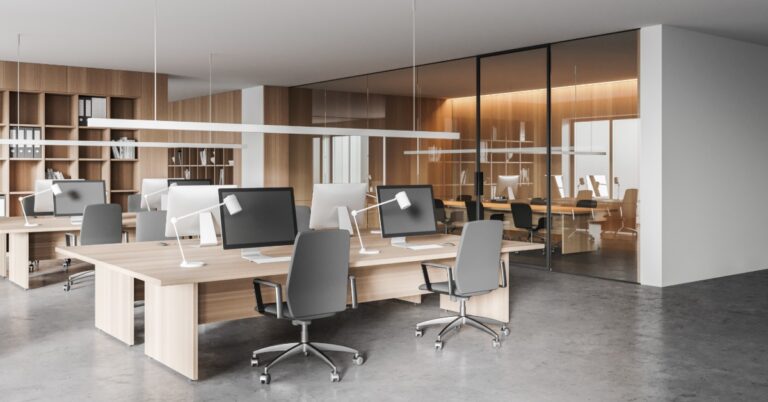
A new workstation setup can look great on paper, but the real test comes when employees sit down and start plugging things in. If chargers stretch across walkways or people have to crawl under desks for an outlet, the office starts to feel frustrating fast.

That’s why modern office planning needs to account for electrical components in workstations before furniture gets ordered. Power access affects where desks go, how clean the space looks, and how easily employees can use their devices during the workday.

Start With the Daily Plug-In Problem

Most offices run on laptops, monitors, phones, printers, and shared charging spots. A workstation needs to support those tools without creating a mess of cords.

Before choosing desks or panels, look at what employees use every day. A person with two monitors needs a different setup than someone who works from a laptop at a shared desk. A reception desk may need power for phones, printers, card readers, and visitor-facing devices.

When those needs guide the furniture plan, the office feels easier to use.

Keep Cords Out of Walkways

Loose cords can make an office look unfinished. They can also get in the way of chairs, cleaning, and foot traffic. Even a high-quality workstation can feel poorly planned when power strips sit on the floor.

A better plan keeps cords close to the furniture. That may mean using powered panels, floor access, under-desk trays, or desktop grommets. The right choice depends on the layout.

Choose Furniture That Supports Power Access

Modern workstation furniture often includes options for outlets, USB ports, data access, and cable routing. These features help employees plug in without covering the desk surface with wires.

Built-in power also helps the office keep a polished look. That matters in spaces where clients, patients, vendors, or new hires see the work area. Clean workstations send a clear message that the office has a plan.

Match the Layout to the Team

Every office uses workstations differently. Some teams need fixed desks with dependable access to power and data. Others use shared spaces where employees bring laptops and move throughout the week.

Good layout planning accounts for those habits. It also leaves room for change. If a team grows or departments shift, flexible workstations can make future adjustments easier.

Plan for These Workstation Details

A stronger workstation plan often includes:

  • Outlets within easy reach
  • USB or USB-C charging access
  • Cable trays under desks
  • Power routing through panels
  • Floor access for open office layouts
  • Space for monitors and docking stations

These details may seem small during planning, but employees notice them every day.

Bring the Furniture and Power Plan Together

Workstation planning works best when furniture, layout, power access, and installation stay connected. Businesses using office space planning services in Bend, Oregon can get help choosing a setup that fits how their teams work now and how the office may change later.

Central Oregon Office Interiors helps businesses plan office layouts, choose furniture, and manage installation. When the layout accounts for modern workstation electrical integration, businesses can create cleaner desks, easier access to plugs, and a workspace that feels ready for daily use.

Open offices depend on a layout that supports movement, focus, and daily technology use. When cords don’t have a clear place to go, they can crowd desks, gather under workstations, and make the office feel less organized than it should.

That’s why cable management solutions for open plan offices matter early in the planning process. A good plan helps power cords, data lines, and charging access points fit into the layout rather than become an afterthought.

When businesses account for cables before installation, the finished space feels cleaner and works better for the people using it every day.

Why Cable Management Matters in Open Offices

Open offices put more of the workspace in view. Employees can see across desk rows, shared tables, and common areas, which makes cord clutter stand out quickly.

Loose cables also affect how people move through the office. Cords stretched across walking paths can create safety concerns and make a space feel unfinished.

Tangled wires under desks can get in the way of chair movement, cleaning, and equipment changes. A cleaner cable plan helps workstations feel more intentional and easier to use.

Start With the Workstation Layout

Cable planning should start before a business chooses desks or cubicles. The layout determines where employees sit, where equipment goes, and where power access makes the most sense.

A strong workstation plan looks at how people use the space. Some employees may need dual monitors or docking stations, while others may only need a laptop and a charger.

Open offices also need clear walking paths. If desks sit too far from outlets, cords can end up crossing the floor.

Planning helps prevent those issues. It also gives businesses more flexibility when teams grow or seating needs change.

Choose Furniture That Handles Cords Well

The right furniture can solve many cable problems before they start. Commercial office furniture often includes features that help route cords away from work surfaces and walking paths.

Desk grommets give cords a clean path through the work surface. Under-desk trays hold power strips and extra cable length.

Modesty panels can hide cords from view while giving each workstation a cleaner appearance. Panel systems can be especially helpful in open office layouts, as many include channels for power and data lines.

Furniture with built-in cable support also helps businesses avoid short-term fixes. Extension cords and exposed power strips may solve a problem for the moment, but they rarely create a clean, long-term setup.

Sunlit open office with long desks, computer monitors, rolling chairs, plants, city views, and exposed ceiling ducts.

Keep Power Access Close to the Work

Employees shouldn’t have to hunt for outlets during the workday. Power access should support the way people use their desks, meeting areas, and shared spaces.

At individual workstations, power should sit close enough for laptops, monitors, and phones. Employees work more comfortably when they can plug in devices without moving furniture.

Shared tables need the same planning. Team tables and meeting spaces often need access to laptop charging.

Built-in power modules can help these spaces function better without adding loose cords across the room. A thoughtful furniture plan reduces the need for awkward power strips or stretched cords.

Reduce Floor Clutter Before It Starts

Floor clutter can make an open office feel messy fast. Even a well-designed layout can lose its clean look when cords run across walkways or gather around desk legs.

Businesses can avoid many of these problems by planning the cord path before installation. Some layouts may work well with panel-based cable routing, while others may need floor boxes or power poles.

The building itself plays a role, too. Older offices may not have outlets where new workstations need power.

That doesn’t mean the layout won’t work. It means the furniture plan needs to account for the gap between existing power and employee needs.

Make Shared Areas Easier to Use

Open offices often include more than rows of desks. Employees may use shared tables for quick meetings, focused work, or short laptop sessions between appointments.

A shared table without nearby power can feel inconvenient, even if the furniture looks great. Employees may avoid the area if they can’t charge a laptop or connect to the equipment they need.

Built-in outlets can make shared areas more useful. Power access can sit on the tabletop, under the edge, or within a furniture component.

Cable routing below the table also matters. Cords should stay tucked away while still allowing someone to reach connections when equipment changes.

Plan for Technology Changes

Office technology changes over time. Teams add monitors, replace docking stations, move printers, or shift to new phone systems.

A cable plan should support those changes without turning every update into a project. Workstations need enough flexibility for equipment adjustments.

Cords need a clean path, but they also need enough slack for employees to move monitors or adjust desk accessories. A setup that feels too rigid can create problems later.

Velcro ties often work well because teams can open and adjust them. Under-desk trays can hold extra cable length without letting cords hang to the floor.

Bright open workspace with computer monitors, white desks, mesh office chairs, small plants, and a green accent wall.

Match Cable Planning to the Office Style

Cable management should fit the look of the workspace. A modern benching layout may need slim channels and discreet power access.

A panel-based workstation layout may use built-in raceways to hide cords between cubicles. Details like color and placement matter too.

Dark cords can stand out against light desks. Bulky floor covers can interrupt the look of a clean workspace.

The goal is simple: cords should support the work without drawing attention. When cable planning blends with the furniture, the office feels calmer and more organized.

Choose Cubicles That Support Cleaner Cable Paths

Cubicles can help businesses manage cords in open offices without sacrificing structure. Panel-based systems often create a cleaner route for power and data lines, especially when several employees work in the same area.

The right cubicle layout can also help define each workstation. Employees get a clearer work zone, and the office maintains a more organized look.

Companies looking for office cubicles in Bend, Oregon, should consider how each system handles cable routing before choosing a layout. Power access and workstation spacing can both affect how clean the finished office feels.

Work With Installers Before Final Decisions

Installation has a major impact on cable management. A workstation plan may look good on paper, but the setup still needs to work with the building’s outlets and floor plan.

Installers can spot problems before they slow down the project. They may notice that a desk row sits too far from power or that a shared table needs a better cord route.

Professional installation also helps keep cords organized from the start. When employees move into a clean setup, they’re less likely to create temporary fixes that make the office harder to maintain.

Build a Cleaner Open Office From the Start

Cables may seem like a small part of office planning, but they affect how the workplace looks and functions every day. Poor cable routing can make new furniture feel unfinished, while smart planning helps the office feel organized from the start.

The best cable management solutions for open-plan offices begin with the layout and carry through to the furniture plan. When businesses address power access early, they can create workstations that support daily work without extra clutter.

Central Oregon Office Interiors helps businesses choose office furniture that fits the space and supports the way teams work. With a well-planned setup, employees get a cleaner, more professional workspace that is easier to use over time.

A conference table works harder than most people notice. It holds laptops during planning sessions and coffee during morning meetings. It also supports client conversations, team decisions, and the occasional lunch that runs into the next agenda item.

That’s why comparing laminate and veneer conference table surfaces can guide a better choice than choosing by appearance alone. The right choice depends on how often people use the room, how the space should feel, and how much care the table can receive.

Start With How the Room Gets Used

A busy meeting room needs a different table than a formal boardroom. For daily huddles or training, laminate is practical. For client or leadership meetings, veneer offers a polished look. The table should match the room’s purpose.

Consider the busiest day: if people move binders and set drinks, durability is key; if mainly scheduled presentations, appearance is more important.

What Laminate Does Well

Laminate conference tables are ideal for active offices because they resist wear from pens, bags, and cups. They offer diverse styles, including wood-look finishes, neutrals, and darker tones that complement office chairs. Laminate ensures a sharp appearance and durability for frequent use.

For growing companies, laminate helps maintain furniture consistency, making it easier to add more meeting tables as needed.

What Veneer Does Well

Veneer uses a thin layer of real wood, giving the table natural grain and depth. This makes a conference room feel warmer and more refined. Veneer tables are suitable for client-facing or executive rooms, helping them feel more polished, especially with comfortable seating and coordinated storage.

They also work well as focal points; a real wood surface can enhance the impression of a conference room, influencing client perceptions.

Compare Durability and Care

Laminate is ideal for daily use in busy spaces, handling wear better, while veneer can last years but needs better care to avoid damage from spills, heat, and rough handling. It’s a good option but requires more maintenance.

Helpful habits include:

  • Wipe spills soon after they happen
  • Use coasters during longer meetings
  • Lift heavy items instead of dragging them
  • Keep hot food trays off the surface

Small habits can help any conference table look better over time.

Consider the First Impression

The conference table influences room dynamics. A sleek laminate feels modern; a veneer appears warmer and more traditional. Businesses want a polished yet approachable meeting space.

Veneer helps achieve this, but laminate can also look professional with good design. The finish should match the office decor; clashing furniture can feel incomplete. A cohesive table enhances comfort during meetings.

Think About Budget and Value

Laminate is cheaper than veneer, making it ideal for multiple tables or durable surfaces at a lower price, especially in high-use spaces. Veneer costs more due to real wood on the surface, which is suitable for prominent areas like a main conference room.

When comparing laminate and veneer conference tables by use and finish, look beyond the upfront price. The better table is the one that fits the room’s use, care habits, and long-term goals.

Get the Room Right

The table shouldn’t stand alone. Chairs, lighting, flooring, and power access all affect how the space works.

Central Oregon Office Interiors helps teams choose office furniture that fits their space and budget. From planning to installation, their team can help create a conference room that looks professional and works well every day.